An AP manager cut her invoice cycle from twelve days to three. The AI was the smaller half of the change.
A composite AP manager watched her invoice cycle fall from twelve days to three, and the AI reading the PDFs was the smaller half of the story: the real gain came from rebuilding the approval workflow around its confidence score.
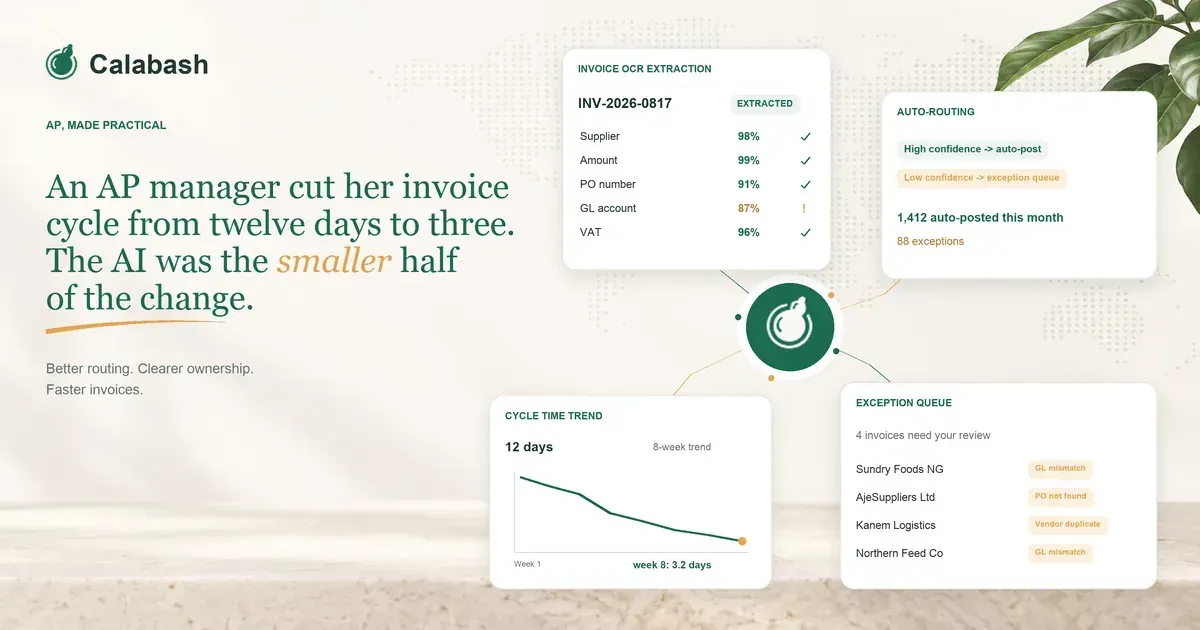
Twelve days. That was her median invoice cycle at the start of the year, from the moment an invoice hit the shared AP inbox to the moment payment was released. Three days by the end of it.
The AP manager I am describing here is a composite drawn from conversations with finance teams at Nigerian mid-market businesses. She is not one real person. The scenario is real in aggregate.
Roughly 1,800 supplier invoices a month. About 250 employees, head office in Lagos, one warehouse in Ibadan. SAP Business One in the middle, two AP clerks reporting to her, she reports to a controller, controller reports to the CFO. Every one of these conversations sounded like a variant of the same story, and the story has a turn in it that I want to write down.
What the twelve days actually looked like
An invoice would land in the shared inbox at ap@ (or a supplier's personal contact, or a WhatsApp thread, or, on a bad day, a printed copy handed to reception). Someone would download the PDF. Someone would open SAP Business One and type the header fields in.
Someone would open three tabs to find the PO number, because the supplier had not quoted the buyer's PO, or had quoted an old one, or had quoted a proforma. Someone would route the invoice to the approver they thought owned that cost centre, because there was no live mapping between cost centres and current approvers, and everyone worked off memory of who had been in that seat six months ago.
Then the chase. Two days of WhatsApp messages to the approver, who was on the road, or on leave, or waiting for the goods received note from the warehouse. When approval came back, someone would reconcile the invoice against the GRN and find a quantity mismatch of two cartons. A query would open with the supplier. Another three days would pass.
Eventually a signed off invoice would land in the payment run. Twelve days, median. Longer at month end, when everything queued behind everything else.
The two AP clerks were quietly burning out. Both were doing the same job, over and over, and both were smart enough to know none of what they did all day was the work they had been hired to do.
The bolt-on that saved 90 seconds and moved nothing
The first thing she tried was the thing every AP manager tries. She bought an "AI invoice reader" module from a vendor pitched at mid-market AP teams and plugged it into the front of the loop. The clerk stopped typing header fields into SAP by hand, because the module read the PDF and populated them.
Saving per invoice: about 90 seconds of typing.
Cycle time impact: none you could see in the number. The invoice still landed in the same inbox, was still routed by memory, still waited for the same approver on the same WhatsApp thread, still got queried against the same GRN. The AI had made one step faster and left the other eleven steps exactly as they were.
She told me the CFO asked her, six weeks in, why the median was still eleven and a half days. She did not have a good answer. The AI vendor's dashboard showed 94% extraction accuracy and she showed the CFO the number and the CFO, sensibly, asked what that had to do with the payment cycle. Which was the correct question.
What actually moved the number
The fix was not a tool. It was a workflow redesign that used the AI's confidence score as the branching signal.
Every extraction the AI returned came with a per-field confidence score. The old workflow ignored it. Everything went into the same queue for a human to review. The new workflow read the score.
If every load-bearing field was above the threshold they set (supplier match, PO match, GRN match, GL coding, tax code, cost centre routing), the invoice went straight through to the payment run. It was coded, matched to its PO and GRN, and routed to the approver whose cost centre ownership was pulled live from a table the controller now maintained.
If any field came back below the threshold, the invoice hit an exception queue. That queue was the entire job of the two AP clerks now. They no longer typed. They no longer chased. They opened the exceptions the AI flagged, looked at what the AI was unsure about, and either resolved it or opened a query with the supplier through a template the workflow generated.
The shape of the numbers, in aggregate:
- Median cycle time: 12 days to 3 days
- Touchless rate: from effectively zero to about 62%
- GL coding errors landing in the P and L: down roughly 80%
- The two AP clerks: for the first time started doing supplier statement reconciliation, which had never been done because nobody had ever had the hours
The AI was doing the same thing it had done in the bolt-on attempt. What changed was what the humans did all day. The clerks stopped being typists and became exception handlers. The AP manager stopped being a chaser and became a policy owner. The exceptions the AI could not resolve became the actual job, instead of the whole job being the parts the AI was quietly fixing.
The lesson she taught me, not the other way around
I went into these conversations thinking the interesting question was which AI invoice reader had the best OCR. I came out thinking the OCR barely mattered. Almost every serious extraction engine in this category is above 90% accurate on structured PDFs from repeat suppliers. What differed was whether the buyer had rebuilt the loop around the confidence output or bolted the AI on top of the old loop.
The bolt-on gives you 90 seconds per invoice. The rebuild gives you the nine days. The tool is easy. The workflow change is where the value sits.
So the practical takeaway I keep giving anyone who asks: do not buy AI to read invoices faster. Buy AI to change what your AP team does all day. If your two clerks are still typing header fields at the end of the pilot, you have not implemented AI in AP. You have implemented a faster typewriter on the same broken loop.
Sign up at calabash.app and bring a recent invoice with its PO, its GRN, and the last query your AP team opened with the supplier, and we will walk through where your loop stalls and what could go straight through.